Minecraft Dungeons 2 World Map & Fast Travel Guide
Navigate Minecraft Dungeons 2 using the world map, fast-travel hubs and nearby friends. Understand connected regions and changing interiors.
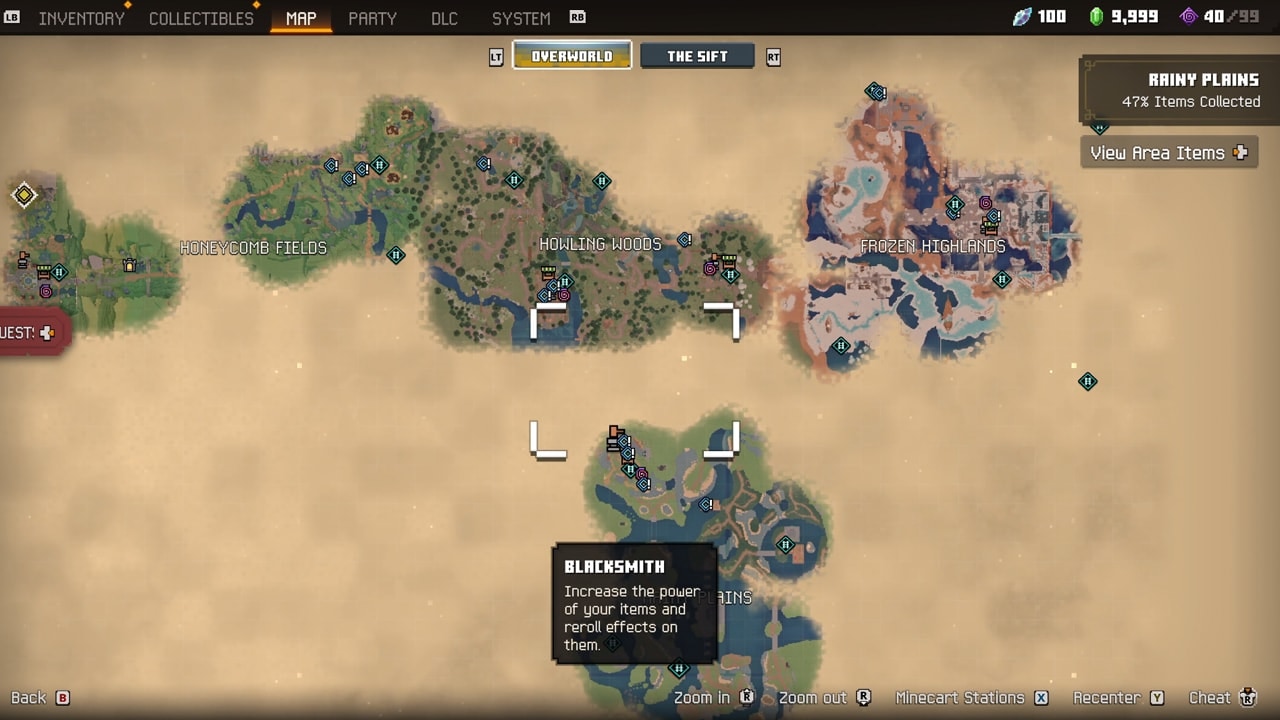

Minecraft Dungeons 2 fast travel belongs to an interconnected world, rather than the first game’s series of isolated missions selected from a camp table. The world map, regional hubs and nearby friends give you different ways to orient yourself. This guide covers navigation decisions on PC and consoles, not a complete waypoint-location map.
How do you use the Minecraft Dungeons 2 map and fast travel?
- Identify the main or side quest you want to follow.
- Open the world map and check where you are relative to that objective.
- Look for a suitable travel hub already available to you.
- Review the destination shown before confirming travel.
- After arriving, use the map again to find the remaining route on foot.
A launch-day guide reports that minecart stations become usable as you discover them, and describes a Guidance Trail pointing toward the active quest. If your current game shows these cues, use the trail for the immediate objective and the map for unexplored branches or side quests.
Use the controls shown by your platform. This guide does not claim that an unseen hub is already unlocked, that every destination is available immediately, or that all fast travel has a particular cost.
What should you do when a cave looks different?
Some caves and forgotten ruins can vary in layout between visits. If a remembered sequence of turns stops working, reassess the current area. A route recorded in one visit is not automatically a permanent map.
Keep track of the objective and the current map rather than relying on a screenshot of an interior from another run. This also explains why a guide should identify its conditions before presenting exact directions.
How do you regroup with friends?
The game includes teleporting to a nearby friend as a navigation aid. If your party has separated, locate one another and check that option in your current session. Do not assume it is a universal teleport to any player anywhere: the official description specifically refers to a nearby friend.
For choosing local, online or mixed play, use the co-op guide. A four-person group benefits from agreeing on the next objective before moving on.
How does the Sift fit into the world?
The adventure spans the Overworld and the Sift, a new dimension. “Interconnected” does not establish a particular portal recipe, an unrestricted route between every location, or the absence of progression requirements.
If you are starting fresh, follow the beginner guide before searching for a full endgame route. This page deliberately does not supply unverified hub coordinates or an invented quest sequence.
Keep exploring
guides
Minecraft Dungeons 2 Co-op & Crossplay Guide
Choose local, online or mixed co-op in Minecraft Dungeons 2. Understand the four-player limit, crossplay, matchmaking and party codes.
guides
Minecraft Dungeons vs Minecraft Dungeons 2: What Changed
Compare the first Minecraft Dungeons with Minecraft Dungeons 2: world structure, gear slots, enchanting, talismans and ranged ammo.
guides
Minecraft Dungeons 2 Beginner Guide
Start Minecraft Dungeons 2 with a clear plan: learn movement, follow quests, compare equipment, unlock enchanting and choose how to play.